之前寫過 Yahoo Mail POP3 及 SMTP 設定,今次再來介紹 Hotmail,只要用以下參數設定電郵軟件便可:
POP3 內送郵件伺服器:pop3.live.com
需要使用 SSL 及 Port 995
SMTP
外寄郵件伺服器:smtp.live.com
需要使用 TLS/SSL* 及 port 25/587
內送及外寄登入資訊跟原 Hotmail 戶口脹號及密碼便可。
*雖然網上資料表示外寄郵件伺服器可使用 SSL ,但個人用 SSL 並不能成功連接伺服器,要改用 TLS 才可以,若外寄郵件失敗,可以嘗試用不同的加密或 Port 設定。
2012年8月8日星期三

2012年7月26日星期四
18 隻免費防毒軟件 (部份連防火牆)
在論壇出的投票文章,改了些再在這裡保仔。
- Avast http://www.avast.com/index_cnt.html (Avast 6.0 功能介紹, 註冊方法, 安裝 Avast 後不能上網的解決方法)
- Avira http://www.free-av.com/ (教你消除免費版的廣告視窗)
- AVG http://www.avgtaiwan.com/home-small-office-security/free-antivirus (AVG 2011 功能及註冊方法介紹)
- Ad-Aware http://www.lavasoft.com/products/ad_aware_free.php (出名的除廣告程式軟件,現在也包括實時防毒,VIPRE 引擎, Ad-Aware Free 安裝及功能介紹)
- Comodo http://www.comodo.com/home/internet-security/antivirus.php ( 全功能連HIPS及防火牆套裝, 新手教學, 減少Defense+警示的方法)
- Microsoft Security Essentials http://www.microsoft.com/security_essentials/default.aspx?mkt=zh-hk, (MSE 2.0介紹)
- Panda Cloud http://www.cloudantivirus.com (Panda Cloud Free 1.3 註冊方法及功能介紹)
- PCTools http://www.pctools.com/zh/free-antivirus/
- 360殺毒 http://sd.360.cn/
- 瑞星 http://www.freerav.com/
- FortiClient http://www.forticlient.com/ (全功能連HIPS及防火牆,不過似乎幾難用,新手不宜)
- digital defender free http://www.digital-defender.com/digital-defender-free (據聞採用 VirusBuster 防毒引擎)
- 金山毒霸 http://www.ijinshan.com/duba/index.shtml (簡介)
- Outpost Security Suite Free http://free.agnitum.com/ (全功能連HIPS及防火牆套裝,據報採用 VirusBuster 防毒引擎,簡介)
- Roboscan Internet Security Free http://roboscan.com/home/home_main.aspx (防毒連防火牆套裝,採用 BD OEM 及自家的 Tera 引擎,防火牆只有基本的連入連出監控,沒有白名單,預設不啟用及不攔連出,或許另配智能一點的防火牆較好,簡介)
- UnThreat Free http://www.unthreat.com/free-antivirus (採用 VIPRE OEM 引擎及自家的啟發式偵測,據說偵測率不錯)
- ZoneAlarm Free Antivirus + Firewall http://www.zonealarm.com/security/en-us/zonealarm-free-antivirus-firewall.htm(老牌防火牆軟件商現在也出免費防護套裝,據聞採用卡巴 OEM 防毒引擎)
MYFreeAntivirushttp://www.mysecuritycenter.com/en/products/my-free-antivirus (BD 2012 OEM 版,新推出,公司不出名,現好像會變相收取一些費用)
測試比較報告:
AV-Comparatives "真實世界" 動態測試每月結果
MRG Flash Test 新病毒測試
AV-Comparatives (12年7月) Heuristic/Behavioural Test (連誤報比較)
AV-Comparatives (12年6月) 防毒卡唔卡機的比較測試報告
VB100 測試結果總覽(10/2011 至 6/2012)
AV-Test Product Review - Mar/Apr 2012
AV-Comparatives (12年3月) On-Demand 偵測率測試報告
CRDF Threat Center:zero-day detection daily statistics
MRG Comparative Assessment September 2011
PCSL 大中华区综合防御能力测试2011.3
AV-Comparatives (11年2月) 防毒軟件誤報(FP)測試報告
PCSL反病毒軟件誤報測試2011年第一期
2012年5月16日星期三
誤刪檔案救星 Recuva
 |
| 指引精靈視窗 |
 |
| 選擇檔案類型 |


結果列表會列出找到的已刪檔案並顯示狀態是否良好,良好狀態的檔案都應可成功回收並儲存到自訂的位置。
除了可以救已刪除的檔案,在進階模式應可從損壞或被格式化的碟片上救回檔案,不過個人就沒有試用。
 |
| 進階模式應可從損壞或被格式化的碟片上救回檔案 |
2012年4月23日星期一
F-Secure Easy Clean 綠色掃毒軟件
F-Secure Easy Clean 是一款綠色掃毒及清毒軟件,下載後就可以直接執行,不用安裝,介面及功能都十分簡單。
管網介紹
F-Secure Easy Clean finds and removes many of the most common viruses, worms, and spyware detected by our Labs. When run, it will also do a quick check for rootkit symptoms on the computer and then proceed with scanning and removing infections.
管網連結
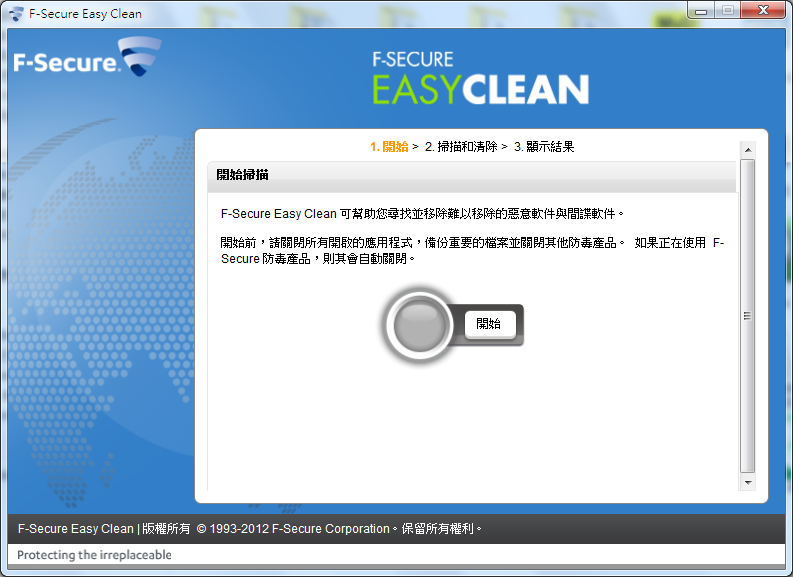 |
| 執行後會自動選擇語言 |
F-Secure Easy Clean finds and removes many of the most common viruses, worms, and spyware detected by our Labs. When run, it will also do a quick check for rootkit symptoms on the computer and then proceed with scanning and removing infections.
管網連結
2012年2月17日星期五
要檔案管理員不顯示某類檔案
有時圖片資料夾除了圖片本身的圖檔,還會顯示一些圖片的附屬檔案,例會用程式修改 RAW 圖檔後會產生一個 xmp 檔,這樣在瀏覽圖片資料夾時便多了一些空白縮圖而不太美觀,若不想看到 xmp 檔可以打開命令提示字元(cmd.exe),並在圖片資料夾下執行以下指令把 xmp 檔設定為隱藏的屬性。
attrib +h *.xmp /s
若要再顯示 xmp 檔可執行以下指令
attrib -h *.xmp /s
2012年2月15日星期三
在檔案管理員顯示 psd 檔縮圖
Microsoft 提供的相機轉碼器套件可以使檔案管理員顯示 RAW 格式檔縮圖,但不能顯示 Photoshop 的 PSD 檔縮圖,雖然網上只找到收費的轉碼器套件(codec)提供這功能,但只要做多一點功夫,也可以免費的加入這功能。
Microsoft Expression Blend 3 內建有 PSD 檔的 codec,只要下載試用版的 Microsoft Expression Blend 3,然後解壓取出 codec 檔便可。
Microsoft Expression Blend 3.0 Trial: 下載連結
使用解壓軟件解壓 Blend_Trial_en.exe 並在 Setup 資料夾內的 BlImp.cab 檔取出 PSDCodec.dll,將 PSDCodec.dll 檔復制至硬碟如 "C:\Program Files\PSDCodec" 中,並執行以下指今;
regsvr32 "C:\Program Files\PSDCodec\PSDCodec.dll"
重新開機便可在檔案管理員中看到 PSD 檔的縮圖。

這 codec 好像不支援 64bit Windows,有需要可以試用 sagethumbs 檔案管理員 plugin
http://code.google.com/p/sagethumbs/
原文(英文)參考
http://www.ghacks.net/2009/07/29/view-photoshop-psd-thumbnails-in-vista-and-windows-7-explorer/
原文說要安裝 Visual C++ 2008 SP1 Redistributable Package,但我並沒有安裝也可正常使用,或許是電腦上已有 Visual C++ 2010。
Microsoft Expression Blend 3 內建有 PSD 檔的 codec,只要下載試用版的 Microsoft Expression Blend 3,然後解壓取出 codec 檔便可。
Microsoft Expression Blend 3.0 Trial: 下載連結
使用解壓軟件解壓 Blend_Trial_en.exe 並在 Setup 資料夾內的 BlImp.cab 檔取出 PSDCodec.dll,將 PSDCodec.dll 檔復制至硬碟如 "C:\Program Files\PSDCodec" 中,並執行以下指今;
regsvr32 "C:\Program Files\PSDCodec\PSDCodec.dll"
重新開機便可在檔案管理員中看到 PSD 檔的縮圖。

這 codec 好像不支援 64bit Windows,有需要可以試用 sagethumbs 檔案管理員 plugin
http://code.google.com/p/sagethumbs/
原文(英文)參考
http://www.ghacks.net/2009/07/29/view-photoshop-psd-thumbnails-in-vista-and-windows-7-explorer/
原文說要安裝 Visual C++ 2008 SP1 Redistributable Package,但我並沒有安裝也可正常使用,或許是電腦上已有 Visual C++ 2010。
2012年2月9日星期四
Microsoft 相機轉碼器套件
要使檔案管理員顯示 RAW 格式的相片的縮圖,以往要到相機廠家的網站下載 codec (轉碼器套件) 安裝,現在微軟提供了集成不同廠家的相機轉碼器套件,安裝後便可以看到不同相機的 RAW 格式相片縮圖。
下載連結
下載連結
2012年1月20日星期五
Comodo Cleaning Essentials 綠色掃毒軟件
Comodo 的防火牆比較出名,他也有防毒但就沒防火牆的好用,但他的綠色掃毒 Comodo Cleaning Essential 似乎就比他的防毒出色,在最近在 PCMAG.com 的清毒測試中還得到 Editor's Choice。
這裡有編詳細的介紹,我又可偷懶不多寫了。
http://www.share-blog.biz/bg/?p=2037
PCMAG.com 的評測
http://www.pcmag.com/article2/0,2817,2398834,00.asp
官網 http://www.comodo.com/business-security/network-protection/cleaning_essentials.php
這裡有編詳細的介紹,我又可偷懶不多寫了。
http://www.share-blog.biz/bg/?p=2037
PCMAG.com 的評測
http://www.pcmag.com/article2/0,2817,2398834,00.asp
官網 http://www.comodo.com/business-security/network-protection/cleaning_essentials.php
訂閱:
文章 (Atom)