顯示包含「防毒軟件」標籤的文章。顯示所有文章

2012年7月26日星期四

18 隻免費防毒軟件 (部份連防火牆)

在論壇出的投票文章,改了些再在這裡保仔。

只包括有實時保護及殺毒功能的防毒軟件,一些只有掃描功能的並不算,這些軟件都是永久免費,有些如 avast、avira.. 等有軟件有效期的都可免費再續期,部份軟件有分收費版及免費版,請注意正確下載及安裝免費版。
  1. Avast http://www.avast.com/index_cnt.html (Avast 6.0 功能介紹, 註冊方法, 安裝 Avast 後不能上網的解決方法)
  2. Avira http://www.free-av.com/ (教你消除免費版的廣告視窗)
  3. AVG http://www.avgtaiwan.com/home-small-office-security/free-antivirus (AVG 2011 功能及註冊方法介紹)
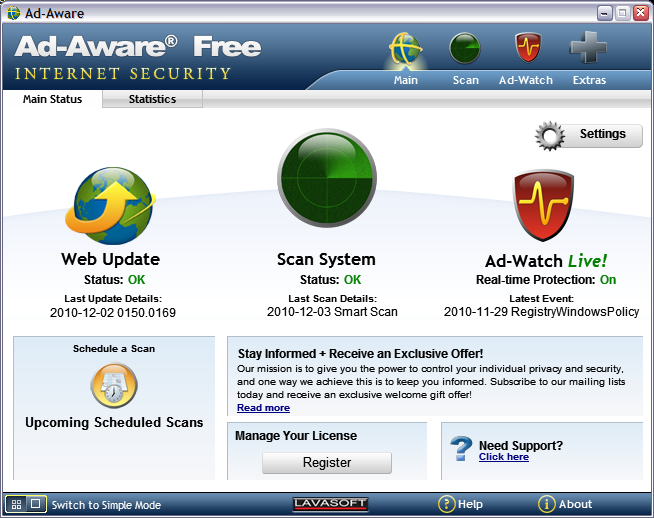
  4. Ad-Aware http://www.lavasoft.com/products/ad_aware_free.php (出名的除廣告程式軟件,現在也包括實時防毒,VIPRE 引擎, Ad-Aware Free 安裝及功能介紹)
  5. Comodo http://www.comodo.com/home/internet-security/antivirus.php ( 全功能連HIPS及防火牆套裝, 新手教學, 減少Defense+警示的方法)
  6. Microsoft Security Essentials http://www.microsoft.com/security_essentials/default.aspx?mkt=zh-hk, (MSE 2.0介紹)
  7. Panda Cloud http://www.cloudantivirus.com (Panda Cloud Free 1.3 註冊方法及功能介紹)
  8. PCTools http://www.pctools.com/zh/free-antivirus/
  9. 360殺毒 http://sd.360.cn/
  10. 瑞星 http://www.freerav.com/
  11. FortiClient http://www.forticlient.com/ (全功能連HIPS及防火牆,不過似乎幾難用,新手不宜)
  12. digital defender free http://www.digital-defender.com/digital-defender-free (據聞採用 VirusBuster 防毒引擎)
  13. 金山毒霸 http://www.ijinshan.com/duba/index.shtml (簡介)
  14. Outpost Security Suite Free http://free.agnitum.com/ (全功能連HIPS及防火牆套裝,據報採用 VirusBuster 防毒引擎,簡介)
  15. Roboscan Internet Security Free http://roboscan.com/home/home_main.aspx (防毒連防火牆套裝,採用 BD OEM 及自家的 Tera 引擎,防火牆只有基本的連入連出監控,沒有白名單,預設不啟用及不攔連出,或許另配智能一點的防火牆較好,簡介)
  16. UnThreat Free http://www.unthreat.com/free-antivirus (採用 VIPRE OEM 引擎及自家的啟發式偵測,據說偵測率不錯)
  17. ZoneAlarm Free Antivirus + Firewall http://www.zonealarm.com/security/en-us/zonealarm-free-antivirus-firewall.htm(老牌防火牆軟件商現在也出免費防護套裝,據聞採用卡巴 OEM 防毒引擎)
  18. MYFreeAntivirus http://www.mysecuritycenter.com/en/products/my-free-antivirus (BD 2012 OEM 版,新推出,公司不出名,現好像會變相收取一些費用)

測試比較報告:
AV-Comparatives "真實世界" 動態測試每月結果
MRG Flash Test 新病毒測試
AV-Comparatives (12年7月) Heuristic/Behavioural Test (連誤報比較)
AV-Comparatives (12年6月) 防毒卡唔卡機的比較測試報告
VB100 測試結果總覽(10/2011 至 6/2012)
AV-Test Product Review - Mar/Apr 2012
AV-Comparatives (12年3月) On-Demand 偵測率測試報告
CRDF Threat Center:zero-day detection daily statistics
MRG Comparative Assessment September 2011
PCSL 大中华区综合防御能力测试2011.3
AV-Comparatives (11年2月) 防毒軟件誤報(FP)測試報告
PCSL反病毒軟件誤報測試2011年第一期

2011年6月1日星期三

Microsoft Safety Scanner

Microsoft 官方出的綠色掃毒軟件。


官方介紹
Microsoft Safety Scanner 是可免費下載的安全性工具,您可隨時用來掃描電腦並移除病毒、間諜軟體和其他惡意軟體。 它可與您現有的防毒軟體搭配運作。

請注意: Microsoft Safety Scanner 將於下載後的第 10 天到期。 若要使用最新的反惡意程式碼定義檔重新執行掃描,請重新下載並執行 Microsoft Safety Scanner。

Microsoft Safety Scanner 並不可取代提供持續防護的防毒軟體程式。

官方網站

2011年3月8日星期二

十三隻掃毒開機 LIVE CD

LIVE CD 可以為己中毒深而不能開機的電腦掃毒,看到有介紹有網站介紹了多隻掃毒開機光碟,雖有點過時,但大部份是免費的,也可以參考一下。

原文連結
13 Antivirus Rescue CDs Software Compared in Search For the Best Rescue Disk

十五隻免費防毒軟件

己有更多免費防毒軟件,更新一下。

現在的免費防毒軟件功能及檢測率也不差,若不是要求特別高或是公司企業的應用,基本上已經可以代替一般要收費的防毒軟件,以下列出的只是有實時保護殺毒功能的軟件,只有掃描功能的並不抱括。

Avast http://www.avast.com/index_cnt.html (Avast 6.0 功能介紹, 註冊方法, 安裝 Avast 後不能上網的解決方法)

Avira http://www.free-av.com/ (教你消除免費版的廣告視窗)

AVG http://www.avgtaiwan.com/home-small-office-security/free-antivirus (AVG 2011 功能及註冊方法介紹)

Ad-Aware http://www.lavasoft.com/products/ad_aware_free.php (出名的除廣告程式軟件,現在也包括實時防毒, Ad-Aware Free 安裝及功能介紹)

Comodo http://www.comodo.com/home/internet-security/antivirus.php (新手教學, 繁中語言包下載及使用方法 4.1 / 5.0, 減少Defense+警示的方法)

Microsoft Security Essentials http://www.microsoft.com/security_essentials/default.aspx?mkt=zh-hk, (MSE 2.0介紹)

Panda Cloud http://www.cloudantivirus.com (Panda Cloud Free 1.3 註冊方法及功能介紹)

PCTools http://www.pctools.com/zh/free-antivirus/

360殺毒 http://sd.360.cn/

瑞星 http://www.freerav.com/

FortiClient http://www.forticlient.com/ (全功能連HIPS及防火牆,不過似乎幾難用,新手不宜)

digital defender free http://www.digital-defender.com/digital-defender-free

可牛殺毒 http://sd.keniu.com/ (使用卡巴掃毒引擎+金山雲)

金山毒霸 http://www.ijinshan.com/duba/index.shtml (簡介)

Outpost Security Suite Free http://free.agnitum.com/ (全功能連HIPS及防火牆套裝,簡介)

舊貼 十一隻免費防毒軟件

2011年2月24日星期四

Avast 5.1 已可直接更新上 Avast 6.0.1000

已經可以用 Avast 5.1 內的程式更新直接升級上 Avast 6.0.1000,但官方論壇還未有 6.0.1000 的 release note。

2011年2月21日星期一

Avast 6.0 beta 試用

Avast 6.0 已推出第二版 beta,修正了第一版大部份的臭蟲,便下載來試試。

Avast 6.0 免費版也加入不少新功能或強化了原有功能,官方公佈如下︰
- AutoSandbox – suspicious programs will be optionally run sandboxed
- avast! WebRep – browser plugin for website reputation rating
- Script Shield now even in the Free AV
- Site Blocking now even in the Free AV
- Restore factory settings command (Settings -> Troubleshooting)
- Automatic actions in the boot-time scan
- New compression method in the installer makes the setup packages about 20% smaller.
- Script Shield now functional even with IE8/IE9 Protected Mode
- Sidebar gadget
- Improved stability/compatibility of the Behavior Shield
- Improvements in the avast! sandbox

注意安裝 6.0 前要先移除原有 5.x 版,安裝時已提供繁中選項,安裝後也如前版要程式註冊。

新版介面並沒有大改變

免費版加入了原付費版有的腳本防護功能


其他防護下可以找到 6.0 的新功能-全自動沙盒、網頁信譽評價及站台封鎖

全自動沙盒
網頁信譽評價
部台封鎖

新的全自動沙盒會將可疑的應用程式開啟時自動移到沙盒內執行﹐不過預設會有警告示窗彈出,詢問用戶是否確定程式在沙盒內執行,若是用戶已知的安全程式,可以選擇不在沙盒內執行。
沙盒警告示窗

用戶可以在警告示窗勾選記住程式的沙盒設定,也可以在沙盒的設定視窗加入排除檔案。

自動沙盒只提供簡單的設定

網頁信譽評價會在瀏覽器的工具列上加入小圖示顯示正在瀏覽的網頁是否安全,按一下小圖會彈出評價視窗讓用戶反影對網頁評價,可以看到這部份還未中文化。

網頁信譽評價視窗


新版也提供桌面小工具,不過用處不大,功能似乎跟原有小圖示重疊。

桌面小工具
試用感想
1. Avast 6.0 維持原有佔用資源少及不大影响電腦效能的好處
2. 免費版可享原有收費版的功能,防護有所加強
3. 個人一直以 Comodo 防火牆配合 Avast 使用,Avast 新版的沙盒及加強了的行為防護跟 Comodo 的功能有所重疊,試用時 Avast 沙盒內的程式可用性似乎比 Comodo 沙盒差,Avast 沙盒中的 Q-Dir 就不能抄擋案,Avast 的白明單似乎也比 Comodo 的少,所以之前試用行為防護時有些不必要的彈窗,所以個人選擇不安裝 Avast 的行為防護,不過也可能是本人常的程式比較配合 Comodo,用戶可以自行試試那一個程式的沙盒及行為防護會較合用
4. 試用了一天,beta 版暫時沒有特別問題

官方論壇介紹

免費版下載連結
http://files.avast.com/files/beta/6.0.986/setup_av_free.exe

2010年12月30日星期四

Comodo Internet Security 5.3 正式推出

Comodo 是我一直使用開的防火牆軟件,今天有新版推出。

What's new in 5.3.174622.1216?

Below are *some* of the enhancements. The fixes included in the release notes are not the full list of the fixes.

NEW! Full IPv6 Support in firewall
NEW! Rootkit Scanner - Hidden registry keys, files and folders are detected
NEW! 5 skins from COMODO, including a native windows skin
IMPROVED! AV database updating - Virus DB size reduced significantly
IMPROVED! AV engine - fixed some bugs and added new detection mechanisms
IMPROVED! Cloud scanning is enabled by default in manual scanner now
IMPROVED! Installer - It now enables/disables windows firewall/defender during the installation/uninstallation
FIXED! CIS causes massive amount of entries in windows security audit logs
FIXED! AV does not validate the revocation status of the certificates in signed binaries
FIXED! BSOD in cmderd.sys

Frequently Asked Questions(FAQ)

Q - Which link should I use to download?
A - If you are not one of the users of CIS Pro/Plus/Complete, you should use CIS Premium links.

Q - I am an existing user using a paid version of CIS Plus/Pro/Complete) What should I do?
A - We recommend you to wait for the updates next week. Only the setups are released as of today(12/29/2010). However, if you would like to reinstall, we have included the links below for our reference.

Q - I am an existing user using a previous version of CIS. Do I receive the updates now?
A - Only the setups are released as of today(12/29/2010). We will be issuing the updates next week.

Q - Should I uninstall CIS 5.0 and reinstall CIS 5.3?
A - You dont have to. You will get the update next week anyway. But if you dont want to wait, you can.

Q - I dont want to wait for updates. Do you recommend me to uninstall CIS 5.0 and install CIS 5.3 if I have my own security configurations with a lot of changes to the defaults?
A - No. It is better to wait for updates if you want to keep your existing settings. Although importing your previous security configuration might keep your existing settings, you might miss new modifications to the default policies. Are there big security risks if i do so though? No.

Q - Does CIS 5.3 include DACS?
A - No. It is still being developed.

Q - I had reported an issue before. Is it addressed in this release?
A - We are grateful to you for helping us by reporting the issues you observed. Please be certain that all of the issues reported in the forum are in our formal release process. It *might* have been addressed in this release. But if it didnt, it will definetly be in the future releases.

Q - Are the versions downloaded from the web site the same as these?
A - Yes they are.

Q - Why doesnt the web page include the latest version infromation yet?
A - It is being updated and be online soon. Because you are a comodo family member, we would like to give you this release as a new year's gift.


Download Locations:

CIS Premium:

64 Bit Operating Systems:

http://download.comodo.com/cis/download/installs/1000/standalone/cispremium_installer_x64.exe
Size: 36M ( 37477704 )
MD5: ea17f83366da89443b93d3be50677a5d
SHA1: 08e1580ec6c1ec4b2204c9ebe5d39a4360c21610

32 Bit Operating Systems:

http://download.comodo.com/cis/download/installs/1000/standalone/cispremium_installer_x86.exe
Size: 34M ( 35188552 )
MD5: 2b9e02d280436011429bceb5c0a1953c
SHA1: 8f03397c1e0567317c1015dd8bf966e3c147193d

官方原貼

2010年12月18日星期六

Microsoft Security Essential 2.0 正式推出

微軟正式推出了 Microsoft Security Essential 2.0,MSE 第一版的口碑只是一般,但看過網上一些對 2.0 的前期測試有不錯的評價,說是加強了 IE 及 Windows 內建防火牆與 MSE 的整合,使他對用戶上網時有更強的防護,據聞新版也加入了類似智能行為防護的功能。

電腦玩家有編詳細的介紹,我就不在這裡多寫了。
http://playpcesor.blogspot.com/2010/12/microsoft-security-essentials-20.html


微軟下載連結
http://www.microsoft.com/security_essentials/default.aspx?mkt=zh-hk

2010年12月16日星期四

金山毒霸

金山最近也加入了免費防毒軟件的行列,本來在虛疑機上試用可牛,但可能因主機上的防毒有網絡監控或是和虛疑機不夾,所以不能自動更新,那就正好試一試金山毒霸。

金山毒霸在一些測試報告上的病毒偵測成績並不出色,但它的效能及資源佔用表現上卻十好,那正好配合防護力較強的 Comodo 防火牆使用。

安娤毒霸時會警告軟件只適用於大陸及簡體視窗,但我安在繁體視窗上也沒有大問題,只是其中一個非主要功能頁面出現亂碼,而且也可以用 Applocale 解決。使用上暫時沒有發現問題,也真的很省資源,希望它能加強查殺能力,說不定未來主機也會轉用它。

查殺功能


不同的監控功能

有增值的清理功能

其它增值功能
官方網站

2010年9月29日星期三

AVG Anti-Virus Free Edition 10.0(2011版)推出了

據說新版效能有所改進,這裡有不錯的網上介紹,我就不再多寫了

官方網站

2010年9月15日星期三

Comodo Internet Security 2011 (ver. 5) 正式推出

有以下新工能及改善

1. 防火牆加入雲測毒 (就算不安娤防毒模組也會檢測要執行的程式)
2. 加入行分析防護
3. 自動檢測不明程式,若在雲白名單(cloud white-listing)會自動把檔案加入本地白名單
4. Game Mode
5. 改善沙盤的兼容性
6. 加強除清毒功能

繁體中文化檔案

官網介紹

What's New In COMODO Internet Security 2011?

THANKS! COMODO would like to thank the beta testers whose feedback made this release possible!

NEW! Extended spyware scanner and improved malware cleaning
NEW! Cloud Based Antivirus Scanning
NEW! Cloud Based Behavior Analysis
NEW! Cloud Based Application White-listing
NEW! Game Mode
IMPROVED! Application Control
IMPROVED! Default Deny re-engineered to improve application compatibility
IMPROVED! Application user interface

Cloud Based Infrastructure:

2011 family of products(Yes COMODO Firewall too!) are now armed with cloud based file rating technologies. The cloud computation, enabled by default, is used for a variety of purposes.(Do not be surprized if COMODO Firewall gives you a malware alert!!!).

With cloud computation;

Cloud based Whitelisting: Safe files and trusted vendors are now easily identified. The concept of “Trusted Publisher” is now cloud based.

Cloud based Anti virus: Malicious files are detected even if the users do not have an up-to-date antivirus product or an antivirus product at all.

Cloud Based Behaviour Analysis: Zero-day malware can be detected INSTANTLY by COMODO’s cloud based behavior analysis system CIMA(Comodo Instant Malware analysis).

Extended Spyware Scanning

COMODO’s vision and focus has been about “keeping a clean computer clean” from early days. Now that We have achieved that COMODO is focusing on “cleaning an already infected computer”. This is why we extended the spyware scanning in COMODO Internet Security 2011 and COMODO Antivirus 2011 and now include a new spyware scanner which is capable of scanning the windows registry and computer disks for the signs of malware infection.

This new scanner is implemented to improve the detection and successful cleaning rate of already infected systems.

Game Mode

2011 family of products are now gamer friendly security applications. When they are put into the game mode, the operations that can interfere with users’ gaming experience such as alerts or resource intensive virus database updates, scheduled scans are suppressed.

Stronger and Smarter Application Control

2011 family of products have a highly smart application control mechanism which extends the functionality of the previous versions.

The new application control provides the users the ability to lockdown their computers such that only the known good applications can be executed.

The new sandbox introduces a new default application isolation level, partially limited, which improves the compatibility with many windows products.

Nowadays, a lot of malware come in other forms than standalone executables. For example, some come in the form of visual basic scripts while some come in the form of java binaries. When they come in such forms, they are executed by “interpreter” applications such as wscript.exe or java.exe etc.

2011 family of products can identify such applications heuristically and detect the real file behind the requests of “interpreters”.

2010年8月13日星期五

Comodo Internet Security 5 beta (更新至 5.0.158836.107)

Comodo 推出 CIS 5(或稱 CIS 2011)測試版,試用了一下,介面作出了較大改變,但主要操作方法沒有太大改變,舊用戶應該不難適應。

似乎內建白名單也加大了,一些以前認不出的程式現在也能自動識別,使用上更方便。


下載網頁
COMODO Internet Security 5.0.158836.1079 Released!

已經有人開始制作繁體中文語系檔案

官網介紹
NEW! Heuristic command-line processing of certain applications: Non-PE executables e.g. Scripts,
Java apps, MS installer files, are now handled by Defense+.
NEW! Ability to add a file to trusted files from sandbox notification
NEW! Ability to clear logs reintroduced
FIXED! After initial install, windows hangs in welcome screen
FIXED! Firewall does not filter windows broadband compatible modems
FIXED! BSOD in windows 7 while uninstalling CIS
FIXED! Sandbox alert shows XML code instead of proper dialog
FIXED! AV crashes while doing spyware scanning
FIXED! Isolated application does not appear in unrecongnized files list
FIXED! cfp.exe crashes randomly

There are many other fixes in this version that i havent included here.

2010年8月1日星期日

Comodo Internet Security 5 beta 推出

Comodo 推出 CIS 5(或稱 CIS 2011)測試版,試用了一下,介面作出了較大改變,但主要操作方法沒有太大改變,舊用戶應該不難適應。

似乎內建白名單也加大了,一些以前認不出的程式現在也能自動識別,使用上更方便。


下載網頁
COMODO Internet Security 5.0.156985.1061 BETA Released

已經有人開始制作繁體中文語系檔案

官網介紹
NEW! Application Whitelisting
CIS 5.x fills the missing links that its predecessors had in this area by providing a usable application white list control.

NEW! Spyware Scanner and improved malware cleaning
CIS 5.x again fulfills the missing features of its predecessors by providing a new spyware scanner which is capable of scanning the windows registry and file system.

Note: We will be releasing the signatures for spyware scanning during the course of BETA testing. So you might not immeidately see this in action. i.e. next monday

NEW! Cloud Based Antivirus Scanning
CIS 5.x has integrated the cloud based computation everywhere. From on-demand scanning to process execution control, it checks if the file is known in the cloud.

NEW! Cloud Based Behavior Analysis
Instant malware analysis has been introduced to CIS 5.x making detection of unknown malware possible! Any unknown file that is sandboxed and NOT observed by COMODO before is submitted to CAMAS and results are sent to the PC in 15 minutes after the upload process is done.

NEW! Game Mode
Now CIS has a game mode. Just before you start to play a game, you can switch to game mode and all the alerts will be suppressed. Virus database updates or schedules scans will also be postponed.

IMPROVED! Default Deny re-engineered to improve application compatibility
Unlike CIS 4.x, CIS 5.x, by default, automatically runs every unknown executable as "Partially Limited", which is a new level introduced with CIS 5.x.

IMPROVED! A New User Interface!
You will be seeing a lot of suprises with the new user interface. It is friendlier, easier and prettier.

2010年7月24日星期六

Norman Security Suite DnBNOR 4 年免費特別版

一般三個月或一年免費的商用軟件不難找到,不過這個是四年免費版,主要功能包括
  • Protection against new and unknown malware
  • Block viruses from entering via email and IM
  • Scanning scheduler
  • Personal firewall
  • Parental Control prevents access to inappropriate websites
  • Time limit kids access to internet
官方下載網頁

2010年7月20日星期二

Ad-Aware Free 防毒軟件

Ad-Aware 是出名的廣告程式移除軟件,現在它不單只偵測廣告程式,還包括了病毒及間諜程式的實時防護。

官網介紹
We have taken the security product millions of people know and trust one step further to give all users the power to protect themselves online. By combining Lavasoft's pioneer anti-spyware technology with traditional anti-virus protection, Ad-Aware Free now features complete malware protection, that won't slow your computer down!

Ad-Aware Free Internet Security features real-time protection, advanced genotype detection technology, rootkit protection, automatic updates, and much more — to ensure that you have the power to protect yourself online.

官方網站

2010年7月12日星期一

六個防護軟件測試的實時視頻

這是 BluePoint 建立的防護軟件測試的實時視頻網頁,正在測試的軟件有
Bluepoint security 2010
Comodo Internet Security 4.1
Panda Cloud Antivirus Pro
Norton Internet Security 2010
Previx 3.0
EmsiSoft Anti-Malware 5.0

http://70.88.179.158:9000/SeventyThreatLiveVideoChallenge/pages/default.aspx

(注意:網站還是在測試階段,測試結果可能有徧差)

官網介紹
The 70 Threat Challenge is a real-time/live broadcast of six operating systems, protected with six different antivirus products. Each system in the challenge is exposed to live & active malware websites from around the world to determine active prevention capabilities of each product tested. This challenge is designed to provide a close to real world scenario for these products. Most of the malware in this test is quite dangerous and should not be allowed to infect the operating system. In this professional lab scenario, there are no ramifications during a malware infection; however, on your computer this could be disastrous. This challenge provides a unique window into the world of antivirus effectiveness and the inner workings of malware.

2010年7月7日星期三

可牛殺毒

可牛殺毒現時還是測試版,雖然只有簡體版本,除了在安娤時出現亂碼,安娤後在繁中視窗中也能正確顯示。可牛殺毒背後應用的技術不錯,令人期待﹔
  • 雙引擎-卡巴掃毒引擎+金山雲
  • 有IE保護、網頁及釣魚網站防護
  • 有電郵防護、關鍵位置防護
  • 有主動防護
  • 提供不同的専殺工具
  • 不過修復漏洞功能在繁中視窗不能使用
可牛殺毒介面

 官方網站

註:在VM試用,發現病毒碼自動更新運作不是很好,常要手動更新。

2010年6月29日星期二

Avast 5.0 更新至 5.0.594

在更新通告中看到對免費版有以下改善;
  • improved interaction with Windows System Restore; namely, avast now auto-repairs itself when it detects a corrupted VPS due to a System Restore (or other reasons)
  • aswSP.sys: solved a minor stability issue
  • solved a problem related to inserting of the license files
  • added the activation code feature
  • solved a problem when avast was progressively slowing down (especially in conjunction with the screensaver)
  • performance improvements in the Behavior Shield
  • avast Screen saver now accessible even in 64-bit Windows Vista
  • stability improvement in aswTdi.sys (solved a compatibility problem with AVG)
  • minor fixes in the GUI
  • added Catalan and Belarusian language packs

2010年6月22日星期二

Linux 上的防毒軟件

嘗試自制専用來掃毒的 Linux LiveCD,因而搜集了一些 Linux 上防毒軟件的資料,暫時找到以下比較出名的
1. Avast (有GUI)
2. Avira (沒有GUI)
3. AVG (沒有GUI)
4. BitDefender (有GUI)
5. ClamAV (有GUI)
6. F-PROT (有非官方GUI, xfprot)

2010年6月17日星期四

教你如何減少 Comodo 防火牆 Defense + 的警示

Comodo 防火牆功能強大,雖然版本4已減少了很多警示,但還是有許多人特別是初用者都嫌它有太多的警示,有人建意關閉 Defense+ 功能,但這差不多廢了 Comodo 的防護能力,個人並不贊同。

其實 Comodo 本身也提供了下列一些方法幫你減少 Defense+ 的警示﹔

1. 我的安全檔案
Comodo 內建了一份安全檔案清單,執行在清單內的檔案時只會有極少的警示,因內建清單只包括一些較流行的程式,用戶可以自己在 Defense+ 的一般設定內,把常用的程式加到"我的安全檔案"清單中。若檔案有軟體商的數位憑證簽章,個人會建議用方法2,因這樣可讓 Comodo 識認更多安全檔案。

2. 我的信任軟體商
Comodo 也內建了一份信任軟體商清單,若檔案是有信任軟體商的數位憑證簽章,便會當為是安全的檔案,用戶同樣可以在 Defense+ 的一般設定內,把常用程式的軟體商加到"我的信任軟體商"清單中。

3. 使用"乾淨系統模式"
若你確定電腦現時沒有感染惡意程式(包括你已下載的安娤檔),你可以使用 Defense+ "乾淨系統模式",這樣現存硬碟上的所有程式都會視為安全的檔案,而 Defense+ 只會監視啟動"乾淨系統模式"後新安娤或下載的程式。

4. 暫時使用"學習模式"
若你的電腦一向沒有問題,你可以用 Defense+ "學習模式"幾天自動建立 Defense+ 的安全規則,再返回安全模式以減少警示,當然使用學習模式時會失去 Defense+ 的保護功能,所以我自己較喜歡啟用學習模式後隨即執行所有常用程式一次,然後立刻返回安全模式。


Comodo Internet Security 的一般使用教學可以參考以下連結
Comodo Internet Security V4(Anti-Virus,Firewall,HIPS)免費中文的防毒+防火牆+HIPS行為防護 (超詳細教學)
Comodo Internet Security 4.0 免費防毒防駭防火牆新版心得